New release: Drag and Drop, absolute positioning and clickable container

We have just released Flet 0.1.41 with drag-and-drop support and other neat features such as absolute positioning of controls inside stack and clickable container!
Drag and Drop
Making drag-and-drop in Flet is a real joy - thanks to a smart drag-and-drop implementation in Flutter! You just have "draggable" control which could be dragged to a "drag target" which calls on_accept event handler when draggable is dropped.

Take a look at Drag-and-Drop example.
Explore Draggable and DragTarget controls, their properties and events.
Absolute positioning inside Stack
All visible controls now have left top, right and bottom properties to let them be absolutely positioned inside Stack, for example:
import flet as ft

def main(page: ft.Page):

    page.horizontal_alignment = ft.CrossAxisAlignment.CENTER
    page.vertical_alignment = ft.MainAxisAlignment.CENTER

    page.add(
        ft.Container(
            ft.Stack(
                [
                    ft.Text("1", color=ft.Colors.WHITE),
                    ft.Text("2", color=ft.Colors.WHITE, right=0),
                    ft.Text("3", color=ft.Colors.WHITE, right=0, bottom=0),
                    ft.Text("4", color=ft.Colors.WHITE, left=0, bottom=0),
                    ft.Text("5", color=ft.Colors.WHITE, left=40, top=35),
                ]
            ),
            border_radius=8,
            padding=5,
            width=100,
            height=100,
            bgcolor=ft.Colors.BROWN_700,
        )
    )

ft.run(main)
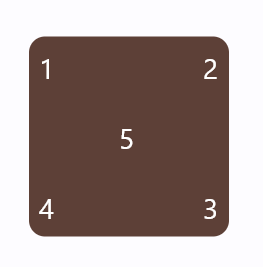
Clickable container
Container control has got on_click event which allows you to make a button from any control and with a beautiful material ripple effect when ink is set to True!

See source code for the example above.
Give Flet a try and let us know what you think!