DataTable2
Enhanced data table for Flet that adds sticky headers, fixed rows/columns, and other UX improvements via the flet-datatable2 extension.
It wraps the Flutter data_table_2 package.
Platform Support
| Platform | Windows | macOS | Linux | iOS | Android | Web |
|---|---|---|---|---|---|---|
| Supported | ✅ | ✅ | ✅ | ✅ | ✅ | ✅ |
Usage
Add flet-datatable2 to your project dependencies:
- uv
- pip
uv add flet-datatable2
pip install flet-datatable2
Examples
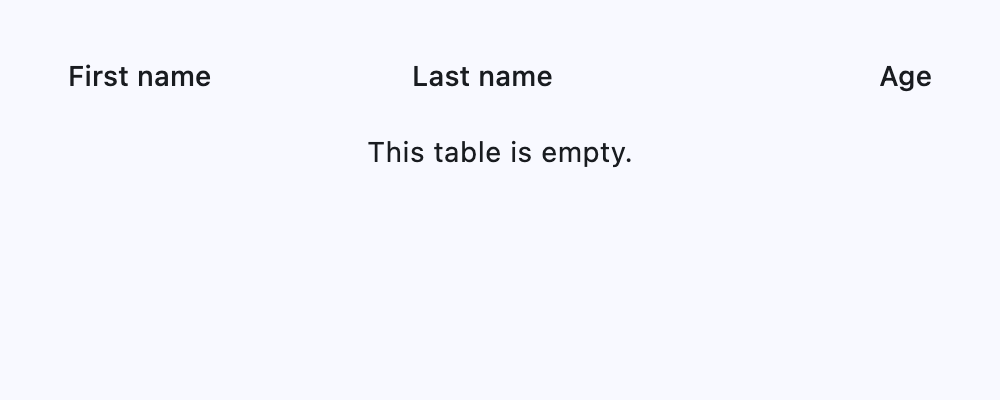
Empty state
import flet as ft
import flet_datatable2 as fdt


def main(page: ft.Page):
    page.add(
        ft.SafeArea(
            expand=True,
            content=fdt.DataTable2(
                expand=True,
                empty=ft.Text("This table is empty."),
                columns=[
                    fdt.DataColumn2(label=ft.Text("First name")),
                    fdt.DataColumn2(label=ft.Text("Last name")),
                    fdt.DataColumn2(label=ft.Text("Age"), numeric=True),
                ],
            ),
        )
    )


if __name__ == "__main__":
    ft.run(main)
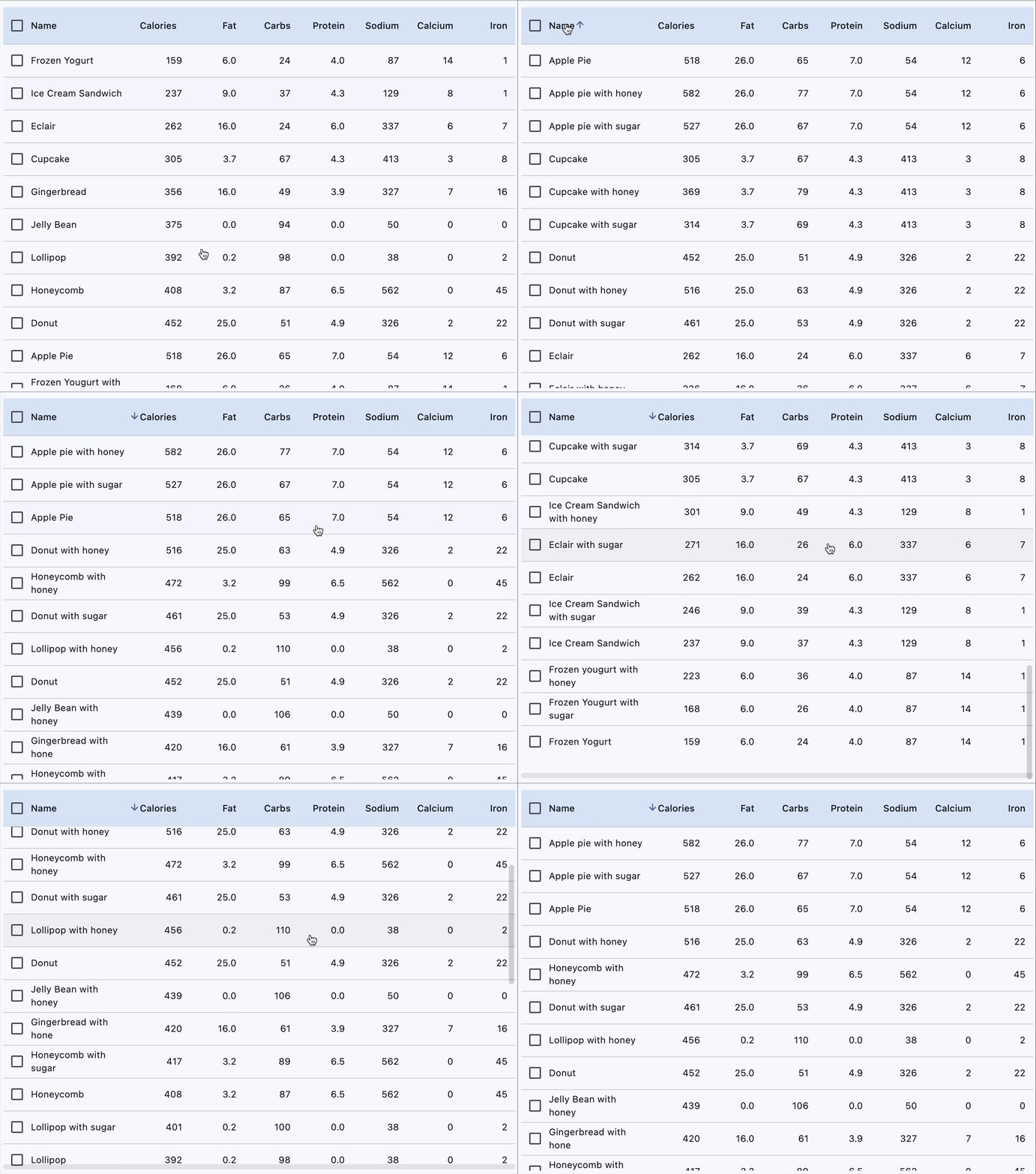
Sortable and selectable
from dataclasses import dataclass

import flet as ft
import flet_datatable2 as ftd


@dataclass
class Dessert:
    name: str
    calories: float
    fat: float
    carbs: float
    protein: float
    sodium: float
    calcium: float
    iron: float


desserts = [
    Dessert("Frozen Yogurt", 159, 6.0, 24, 4.0, 87, 14, 1),
    Dessert("Ice Cream Sandwich", 237, 9.0, 37, 4.3, 129, 8, 1),
    Dessert("Eclair", 262, 16.0, 24, 6.0, 337, 6, 7),
    Dessert("Cupcake", 305, 3.7, 67, 4.3, 413, 3, 8),
    Dessert("Gingerbread", 356, 16.0, 49, 3.9, 327, 7, 16),
    Dessert("Jelly Bean", 375, 0.0, 94, 0.0, 50, 0, 0),
    Dessert("Lollipop", 392, 0.2, 98, 0.0, 38, 0, 2),
    Dessert("Honeycomb", 408, 3.2, 87, 6.5, 562, 0, 45),
    Dessert("Donut", 452, 25.0, 51, 4.9, 326, 2, 22),
    Dessert("Apple Pie", 518, 26.0, 65, 7.0, 54, 12, 6),
    Dessert("Frozen Yougurt with sugar", 168, 6.0, 26, 4.0, 87, 14, 1),
    Dessert("Ice Cream Sandwich with sugar", 246, 9.0, 39, 4.3, 129, 8, 1),
    Dessert("Eclair with sugar", 271, 16.0, 26, 6.0, 337, 6, 7),
    Dessert("Cupcake with sugar", 314, 3.7, 69, 4.3, 413, 3, 8),
    Dessert("Gingerbread with sugar", 345, 16.0, 51, 3.9, 327, 7, 16),
    Dessert("Jelly Bean with sugar", 364, 0.0, 96, 0.0, 50, 0, 0),
    Dessert("Lollipop with sugar", 401, 0.2, 100, 0.0, 38, 0, 2),
    Dessert("Honeycomb with sugar", 417, 3.2, 89, 6.5, 562, 0, 45),
    Dessert("Donut with sugar", 461, 25.0, 53, 4.9, 326, 2, 22),
    Dessert("Apple pie with sugar", 527, 26.0, 67, 7.0, 54, 12, 6),
    Dessert("Frozen yougurt with honey", 223, 6.0, 36, 4.0, 87, 14, 1),
    Dessert("Ice Cream Sandwich with honey", 301, 9.0, 49, 4.3, 129, 8, 1),
    Dessert("Eclair with honey", 326, 16.0, 36, 6.0, 337, 6, 7),
    Dessert("Cupcake with honey", 369, 3.7, 79, 4.3, 413, 3, 8),
    Dessert("Gingerbread with honey", 420, 16.0, 61, 3.9, 327, 7, 16),
    Dessert("Jelly Bean with honey", 439, 0.0, 106, 0.0, 50, 0, 0),
    Dessert("Lollipop with honey", 456, 0.2, 110, 0.0, 38, 0, 2),
    Dessert("Honeycomb with honey", 472, 3.2, 99, 6.5, 562, 0, 45),
    Dessert("Donut with honey", 516, 25.0, 63, 4.9, 326, 2, 22),
    Dessert("Apple pie with honey", 582, 26.0, 77, 7.0, 54, 12, 6),
]


def main(page: ft.Page):
    page.vertical_alignment = ft.MainAxisAlignment.CENTER
    page.horizontal_alignment = ft.CrossAxisAlignment.CENTER

    sorted_desserts = list(desserts)

    def handle_row_selection_change(e: ft.Event[ftd.DataRow2]) -> None:
        e.control.selected = not e.control.selected
        e.control.update()

    def sort_column(e: ft.DataColumnSortEvent) -> None:
        sorters = [
            lambda d: d.name.lower(),
            lambda d: d.calories,
            lambda d: d.fat,
            lambda d: d.carbs,
            lambda d: d.protein,
            lambda d: d.sodium,
            lambda d: d.calcium,
            lambda d: d.iron,
        ]
        sorted_desserts.sort(key=sorters[e.column_index], reverse=not e.ascending)
        table.rows = get_data_rows(sorted_desserts)
        table.sort_column_index = e.column_index
        table.sort_ascending = e.ascending
        table.update()

    def get_data_columns() -> list[ftd.DataColumn2]:
        return [
            ftd.DataColumn2(
                label=ft.Text("Name"),
                size=ftd.DataColumnSize.L,
                on_sort=sort_column,
                heading_row_alignment=ft.MainAxisAlignment.START,
            ),
            ftd.DataColumn2(
                label=ft.Text("Calories"),
                on_sort=sort_column,
                numeric=True,
                heading_row_alignment=ft.MainAxisAlignment.END,
            ),
            ftd.DataColumn2(label=ft.Text("Fat"), on_sort=sort_column, numeric=True),
            ftd.DataColumn2(label=ft.Text("Carbs"), on_sort=sort_column, numeric=True),
            ftd.DataColumn2(
                label=ft.Text("Protein"),
                on_sort=sort_column,
                numeric=True,
            ),
            ftd.DataColumn2(label=ft.Text("Sodium"), on_sort=sort_column, numeric=True),
            ftd.DataColumn2(
                label=ft.Text("Calcium"),
                on_sort=sort_column,
                numeric=True,
            ),
            ftd.DataColumn2(label=ft.Text("Iron"), on_sort=sort_column, numeric=True),
        ]

    def get_data_rows(items: list) -> list[ftd.DataRow2]:
        return [
            ftd.DataRow2(
                specific_row_height=50,
                on_select_change=handle_row_selection_change,
                cells=[
                    ft.DataCell(content=ft.Text(dessert.name)),
                    ft.DataCell(content=ft.Text(dessert.calories)),
                    ft.DataCell(content=ft.Text(dessert.fat)),
                    ft.DataCell(content=ft.Text(dessert.carbs)),
                    ft.DataCell(content=ft.Text(dessert.protein)),
                    ft.DataCell(content=ft.Text(dessert.sodium)),
                    ft.DataCell(content=ft.Text(dessert.calcium)),
                    ft.DataCell(content=ft.Text(dessert.iron)),
                ],
            )
            for dessert in items
        ]

    table = ftd.DataTable2(
        expand=True,
        show_checkbox_column=True,
        column_spacing=0,
        heading_row_color=ft.Colors.SECONDARY_CONTAINER,
        horizontal_margin=12,
        sort_ascending=True,
        bottom_margin=10,
        min_width=600,
        on_select_all=lambda _: print("All selected"),
        columns=get_data_columns(),
        rows=get_data_rows(sorted_desserts),
    )

    page.add(ft.SafeArea(expand=True, content=table))


if __name__ == "__main__":
    ft.run(main)
Column widths
import flet as ft
import flet_datatable2 as fdt


def main(page: ft.Page):
    def cell_text(value: str) -> ft.Text:
        """A helper to truncate any overflowing cell text with an ellipsis."""
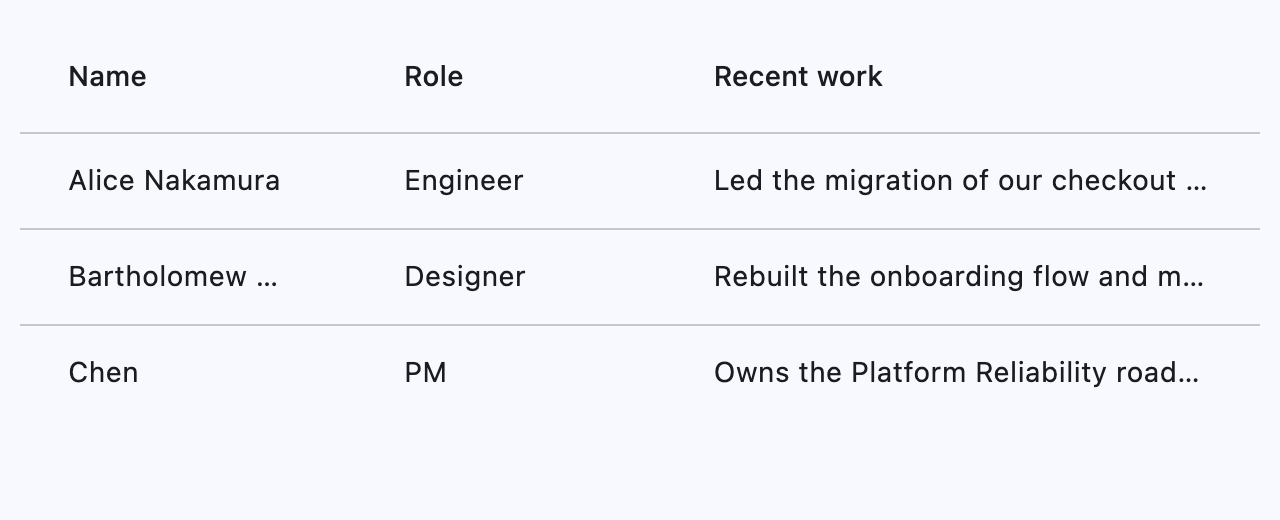
        return ft.Text(value, overflow=ft.TextOverflow.ELLIPSIS, max_lines=1)

    page.add(
        ft.SafeArea(
            expand=True,
            content=fdt.DataTable2(
                expand=True,
                min_width=600,
                columns=[
                    # Absolute pixel width — best for predictable, short fields.
                    fdt.DataColumn2(label="Name", fixed_width=140),
                    # Relative size S — compact, auto-fits the remaining space.
                    fdt.DataColumn2(label="Role", size=fdt.DataColumnSize.S),
                    # Relative size L — takes the lion's share of what's left.
                    fdt.DataColumn2(label="Recent work", size=fdt.DataColumnSize.L),
                ],
                rows=[
                    ft.DataRow(
                        cells=[
                            ft.DataCell(cell_text("Alice Nakamura")),
                            ft.DataCell(cell_text("Engineer")),
                            ft.DataCell(
                                cell_text(
                                    "Led the migration of our checkout service "
                                    "to a set of composable workers, cutting "
                                    "p99 latency in half."
                                )
                            ),
                        ]
                    ),
                    ft.DataRow(
                        cells=[
                            # Longer than 140px — shows ellipsis in a fixed column.
                            ft.DataCell(cell_text("Bartholomew Laurent-Fitzgerald")),
                            ft.DataCell(cell_text("Designer")),
                            ft.DataCell(
                                cell_text(
                                    "Rebuilt the onboarding flow and maintains "
                                    "the internal design-system token registry."
                                )
                            ),
                        ]
                    ),
                    ft.DataRow(
                        cells=[
                            ft.DataCell(cell_text("Chen")),
                            ft.DataCell(cell_text("PM")),
                            ft.DataCell(
                                cell_text("Owns the Platform Reliability roadmap.")
                            ),
                        ]
                    ),
                ],
            ),
        )
    )


if __name__ == "__main__":
    ft.run(main)
Description
Provides sticky header row, scrollable data rows,
and additional layout flexibility with DataColumn2
and DataRow2.
DataTable2 doesn't support
DataTable.data_row_min_height
and DataTable.data_row_max_height
properties present in the parent DataTable.
Use data_row_height instead.
Inherits: DataTable
Properties
bottom_margin- Adds space after the last row if set.checkbox_alignment- Alignment of the checkbox.columns- A list of table columns.data_row_checkbox_theme- Overrides theme of checkboxes in each data row.data_row_height- Height of each data row.data_row_max_heightdata_row_min_heightempty- Placeholder control shown when there are no data rows.fixed_columns_color- Background color for sticky left columns.fixed_corner_color- Background color of the fixed top-left corner cell.fixed_left_columns- Number of sticky columns on the left.fixed_top_rows- Number of sticky rows from the top.heading_checkbox_theme- Overrides theme of the heading checkbox.lm_ratio- Ratio of Large column width to Medium.min_width- Minimum table width before horizontal scrolling kicks in.rows- A list of table rows.show_heading_checkbox- Controls visibility of the heading checkbox.sm_ratio- Ratio of Small column width to Medium.sort_arrow_animation_duration- Duration of sort arrow animation.sort_arrow_icon- Icon shown when sorting is applied.sort_arrow_icon_color- When set always overrides/preceeds default arrow icon color.visible_horizontal_scroll_bar- Determines visibility of the horizontal scrollbar.visible_vertical_scroll_bar- Determines visibility of the vertical scrollbar.
Properties
bottom_marginclass-attributeinstance-attribute
bottom_margin: Number | None = NoneAdds space after the last row if set.
checkbox_alignmentclass-attributeinstance-attribute
checkbox_alignment: Alignment = field(
    default_factory=lambda: Alignment.CENTER
)
Alignment of the checkbox.
data_row_checkbox_themeclass-attributeinstance-attribute
data_row_checkbox_theme: CheckboxTheme | None = NoneOverrides theme of checkboxes in each data row.
data_row_heightclass-attributeinstance-attribute
data_row_height: Number | None = NoneHeight of each data row.
data_row_max_heightclass-attributeinstance-attribute
data_row_max_height: None = field(
    init=False,
    repr=False,
    compare=False,
    metadata={"skip": True},
)data_row_min_heightclass-attributeinstance-attribute
data_row_min_height: None = field(
    init=False,
    repr=False,
    compare=False,
    metadata={"skip": True},
)emptyclass-attributeinstance-attribute
empty: Control | None = NonePlaceholder control shown when there are no data rows.
fixed_columns_colorclass-attributeinstance-attribute
fixed_columns_color: ColorValue | None = NoneBackground color for sticky left columns.
fixed_corner_colorclass-attributeinstance-attribute
fixed_corner_color: ColorValue | None = NoneBackground color of the fixed top-left corner cell.
fixed_left_columnsclass-attributeinstance-attribute
fixed_left_columns: int = 0Number of sticky columns on the left. Includes checkbox column, if present.
fixed_top_rowsclass-attributeinstance-attribute
fixed_top_rows: int = 1Number of sticky rows from the top. Includes heading row by default.
heading_checkbox_themeclass-attributeinstance-attribute
heading_checkbox_theme: CheckboxTheme | None = NoneOverrides theme of the heading checkbox.
lm_ratioclass-attributeinstance-attribute
lm_ratio: Number = 1.2Ratio of Large column width to Medium.
min_widthclass-attributeinstance-attribute
min_width: Number | None = NoneMinimum table width before horizontal scrolling kicks in.
rowsclass-attributeinstance-attribute
A list of table rows.
show_heading_checkboxclass-attributeinstance-attribute
show_heading_checkbox: bool = TrueControls visibility of the heading checkbox.
sm_ratioclass-attributeinstance-attribute
sm_ratio: Number = 0.67Ratio of Small column width to Medium.
sort_arrow_animation_durationclass-attributeinstance-attribute
sort_arrow_animation_duration: DurationValue = field(
    default_factory=lambda: Duration(milliseconds=150)
)
Duration of sort arrow animation.
sort_arrow_iconclass-attributeinstance-attribute
sort_arrow_icon: IconData = Icons.ARROW_UPWARDIcon shown when sorting is applied.
sort_arrow_icon_colorclass-attributeinstance-attribute
sort_arrow_icon_color: ColorValue | None = NoneWhen set always overrides/preceeds default arrow icon color.
visible_horizontal_scroll_barclass-attributeinstance-attribute
visible_horizontal_scroll_bar: bool | None = NoneDetermines visibility of the horizontal scrollbar.
visible_vertical_scroll_barclass-attributeinstance-attribute
visible_vertical_scroll_bar: bool | None = NoneDetermines visibility of the vertical scrollbar.